Chat Is the Product. API Is the Contract. CLI Agents Are the Harness.
1,224 words · 7 min read
Disclaimer: This post reflects my personal views and does not represent the views of my employer or my community.
Caveat: This was written with research assistance from AI tools, but I curated the content, edited the draft, and cross-checked the references.
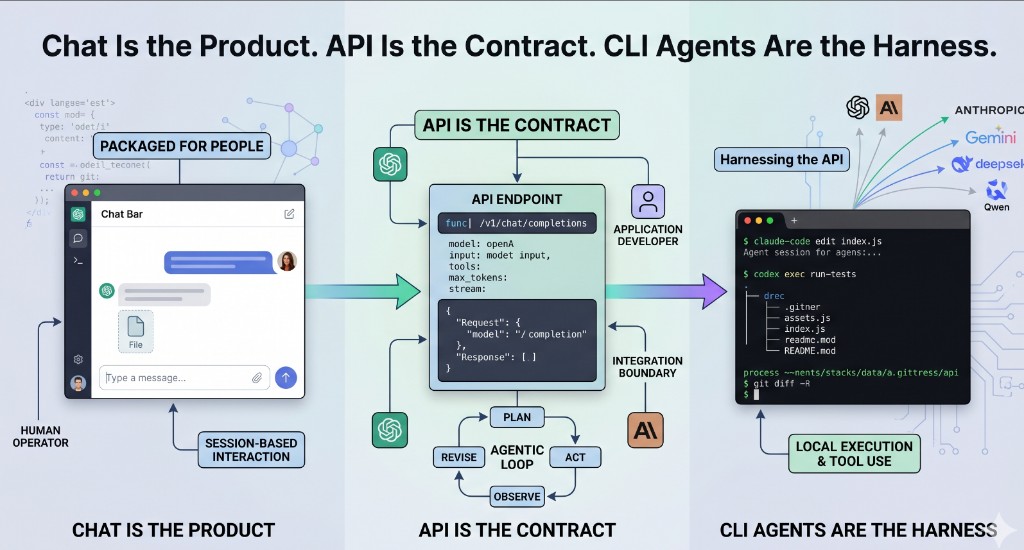
Image: The illustration above was generated with Gemini.
I have done the slow version of AI-assisted coding: paste a failing Python traceback into Claude.ai, read the suggested fix, copy the change into an editor, run the tests, and repeat. I have also watched the terminal version: give Claude Code or Codex CLI the same target, let it inspect the repository, apply a patch, run a command, and come back with the result. The model may be similar. The product around it is not.
Chat is the product
Web and desktop chat apps are packaged products for people. ChatGPT’s macOS Chat Bar is documented as a shortcut for opening a small prompt window, attaching screenshots or files, and asking a question from the desktop [1]. ChatGPT Projects add a container for related chats, files, and instructions. Claude Desktop takes a similar consumer shape: install the app, sign in, and use extensions when you want Claude connected to local tools or services [2]. The product handles authentication, history, file parsing, rendering, and guardrails. The person decides the next prompt.
That is useful, but it is not the same thing as an integration boundary. A person can ask a chat app to summarize a CSV and tolerate a slightly different answer each time. A service needs credentials, a model name, input shape, output shape, token limits, timeout behavior, streaming choices, logging, and error handling. Chat hides most of that because a human is operating the session. An API exposes it because software has to operate the call.
API is the contract
The API is not just chat with the interface removed. It is the contract a program can call. OpenAI’s Responses API is exposed as POST /v1/responses; it accepts text, image, and file inputs, can return text or structured JSON, supports streaming, can continue from a previous_response_id, and can attach tools such as web search, file search, computer use, MCP servers, and custom function calls [3]. Anthropic’s API documentation centers the same kind of operational details: API keys, workspaces, SDKs, request formatting, retries, streaming, timeouts, and typed request and response handling [4].
The important part is not the endpoint name. It is the fields. A developer can set model, input, tools, tool_choice, max_output_tokens, service_tier, safety_identifier, stream, store, and metadata on a request [3]. Those knobs are not visible when someone types into a chat box, but they matter when the same workflow runs ten times, then ten thousand times.
At scale, the API is also a governance boundary. OpenAI’s platform reference includes admin surfaces for users, groups, roles, projects, service accounts, project API keys, project rate limits, audit entries, and usage; Anthropic describes workspaces for segmenting keys and capping spend by use case [3][4]. OpenAI says API data is not used to train or improve models by default unless the customer opts in; personal ChatGPT accounts expose separate data controls for model improvement [5]. Chat is organized around a person’s session. APIs are organized around applications, teams, budgets, and policy.
Agentic programming is a loop on top of the API
Agentic programming is a loop, not a single reply. Anthropic’s engineering guidance draws a useful line: workflows route model and tool calls through paths defined by code, while agents let the model direct more of the process and tool use. Both sit on top of an “augmented LLM” with access to retrieval, tools, and memory [6]. The loop is practical: plan, act, observe, revise. In Anthropic’s tool-use format, the model can request a tool with a structured tool_use block; the application executes it, sends back a tool_result, and the cycle continues [7].
That loop usually closes through software, not through a browser tab. A chat product can expose the tools its owner ships. An application owner can wire in a test runner, issue tracker, database console, deployment API, or internal search index, then inspect the intermediate steps. Anthropic published the Model Context Protocol in November 2024 to standardize how applications connect models to external systems [8]. MCP makes sense because the agent loop is an integration problem as much as a prompt-writing problem.
CLI coding agents are the harness
CLI coding agents sit between desktop chat and raw API code. OpenAI describes Codex CLI as an open-source command-line tool that runs locally, reads and modifies code in the selected directory, runs commands, and can authenticate with either a ChatGPT account or an API key [9]. Anthropic describes Claude Code as an agentic coding tool for searching a codebase, editing files, and running commands across terminal, IDE, desktop, and web surfaces [10].
Their value is locality. Codex can inspect a repository, edit files, run shell commands, use subagents, and script repeatable workflows through codex exec; Claude Code shows the same Unix-style pattern, including examples that pipe git diff main --name-only into Claude for batch review [9][10]. In both cases, the agent has a session, access to the working tree you grant it, and a way to call a model on your behalf. The CLI is not just a chat window rendered in a terminal. It is a harness around the API contract, with execution authority over your project.
A runnable showcase across six providers
The dynamic-llm-api-sdk-examples repository is my concrete version of this idea. It is not a benchmark or a product pitch; it is a working harness for comparing how provider APIs behave in ordinary developer workflows. It puts OpenAI, Claude, Gemini, DeepSeek, Qwen via DashScope, and Z.ai behind one CLI and one Streamlit UI, with the same core operations available in both places [11]. The Make surface is intentionally boring: make setup installs dependencies, make list P=openai enumerates models, make run-cli P=openai PROMPT="hello" sends a prompt, OUT=json asks for structured output, make run-stream P=anthropic PROMPT="explain caching" streams tokens, make check-conn P=anthropic validates credentials, and make test-llm-all runs a deterministic hello prompt across the providers [11].
The architecture is the part I care about. A request comes from the CLI or UI, the service layer builds a ChatRequest, a registry resolves a provider adapter, the adapter calls a native SDK or documented HTTP fallback, and the response is normalized into a ChatResponse. Errors are normalized into categories such as auth, rate limit, bad request, network, server, and unsupported [11]. The repo also includes INSTALL.md for environment setup and CREATE-PR.md for a docs-sync, validate, commit, and push workflow, with CLAUDE.md symlinked as AGENTS.md so Claude Code and Codex CLI can read the same instructions [11].
The cross-provider point is the lesson. DeepSeek documents OpenAI-compatible and Anthropic-compatible API formats; Alibaba Cloud documents an OpenAI-compatible interface for Qwen models through Model Studio; and Z.ai documents standard HTTP APIs with OpenAI SDK examples [12][13][14]. Once the work is at the API layer, provider comparison becomes a matter of base URL, API key, model name, payload shape, streaming behavior, and adapter behavior. That is easier to test than six separate chat products.
Who owns the next action?
The line between web chat, API, and CLI agent is not mainly about model quality. It is about who owns the next action. In web chat, a human owns every turn: read, decide, paste, ask again. In raw API code, the application owns the turn and treats the model as a callable component. In a CLI agent, the model owns more of the loop, the local toolchain executes the steps, and a human supervises the risky parts. Choosing the right surface means choosing the right operator for the work. For production workflows, that operator is usually software.
References
- OpenAI Help Center, “How to launch the Chat Bar”.
- Anthropic Help Center, “Install Claude Desktop”.
- OpenAI Platform, “Responses API reference”.
- Anthropic, “API overview”.
- OpenAI Platform, “How we use your data”; OpenAI Help Center, “Data Controls FAQ”.
- Anthropic, “Building effective agents”.
- Anthropic, “Tool use with Claude”.
- Anthropic, “Introducing the Model Context Protocol”, November 25, 2024.
- OpenAI Developers, “Codex CLI”.
- Anthropic, “Claude Code”.
- GitHub,
rikkisnah/dynamic-llm-api-sdk-examples(README, Makefile,docs/HOW-IT-WORKS.md,INSTALL.md,CREATE-PR.md,CLAUDE.md/AGENTS.mdverified 2026-04-26). - DeepSeek, “API documentation”.
- Alibaba Cloud Model Studio, “Use Qwen by calling the OpenAI-compatible API”.
- Z.ai, “API documentation”.